
MCP INTEGRATIONS
Connect ReviewForge
Bring Steam game intelligence to the AI tools you already use.
Choose your AI agent
Connect ReviewForge to ChatGPT
Analyze Steam reviews directly from your AI chat.
Best for a fast first run. Add Steam Review MCP in ChatGPT, approve access, and start asking about any Steam game.
01 Connect
Open Plugins and enable Developer Mode.
02 Authorize
Create Steam Review MCP and approve access.
03 Analyze
Ask for review insights in plain language.
Use the browser auth flow first: add the server, sign in to ReviewForge, approve access, and start asking questions.
Ask a normal question. ReviewForge supplies the Steam review search, filtering, stats, and freshness checks underneath.
How to connect
Follow these steps to get your first Steam insight.
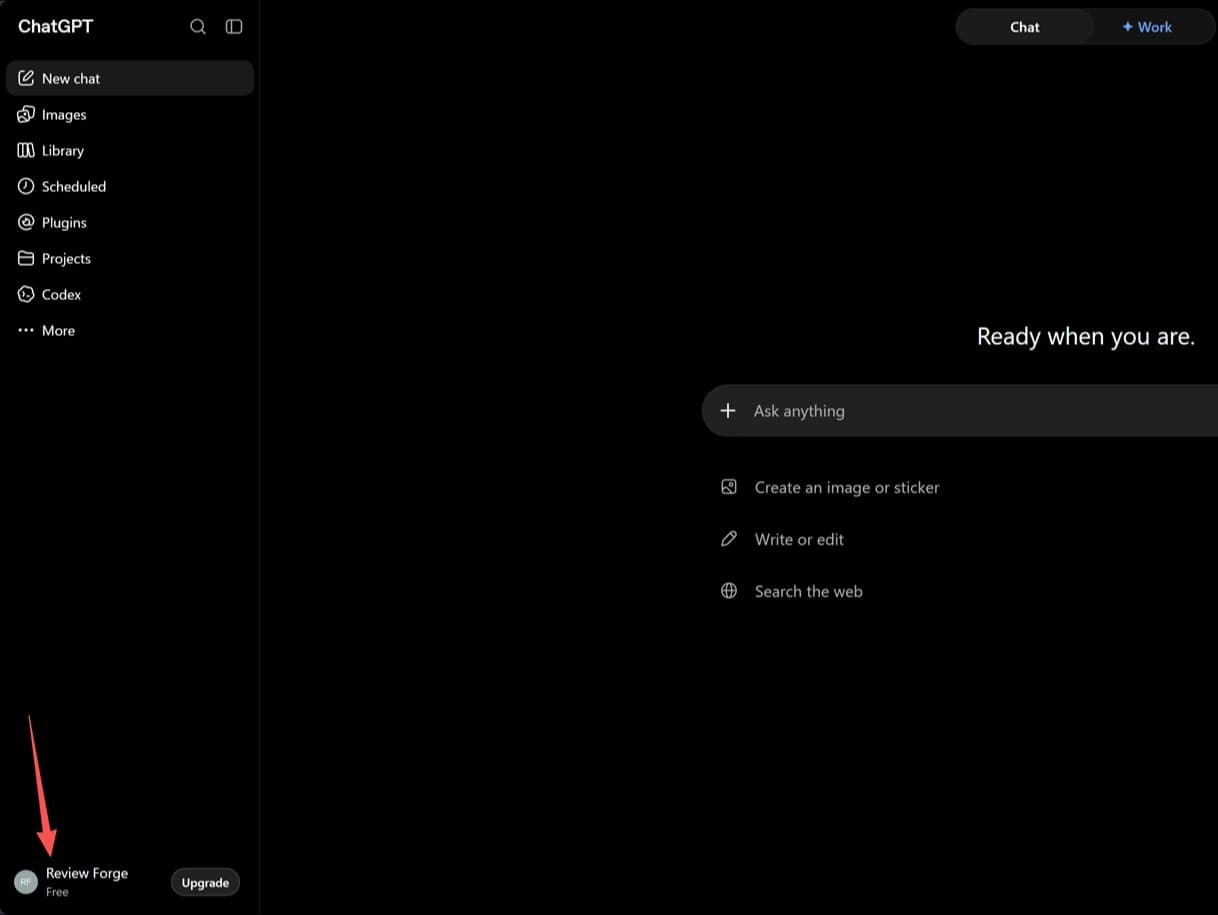
Open your account menu
In the bottom-left corner of ChatGPT, click your ReviewForge account to open the account menu.
What ReviewForge adds to your agent
Your AI agent gets direct access to Steam review intelligence.
Available capabilities
Find the right game before you ask deeper review questions.
Zero in on the exact slice of player feedback you care about.
Track volume, sentiment, and direction over time.
See how current the mirrored Steam data is before you rely on it.
Pull fresh review data when you need the latest signal right now.
Question -> Insight
You
What are players most dissatisfied with about Black Myth: Wukong?
ReviewForge
Try your first analysis
Copy this prompt into your connected AI agent.
Using Steam Review MCP, what are the top complaints in recent Steam reviews for Black Myth: Wukong?
Using Steam Review MCP, what are the top complaints in recent Steam reviews for Black Myth: Wukong?
What do players like and dislike most about Black Myth: Wukong?
How have player reviews of Black Myth: Wukong changed over the past year?
Advanced MCP setup
Using another MCP-compatible client? Connect with the ReviewForge endpoint.
Use the same endpoint for OAuth-capable clients and API-key based MCP setups.